
Redesigning the Project Showcase: Why Blog Posts Live Next to Projects Now
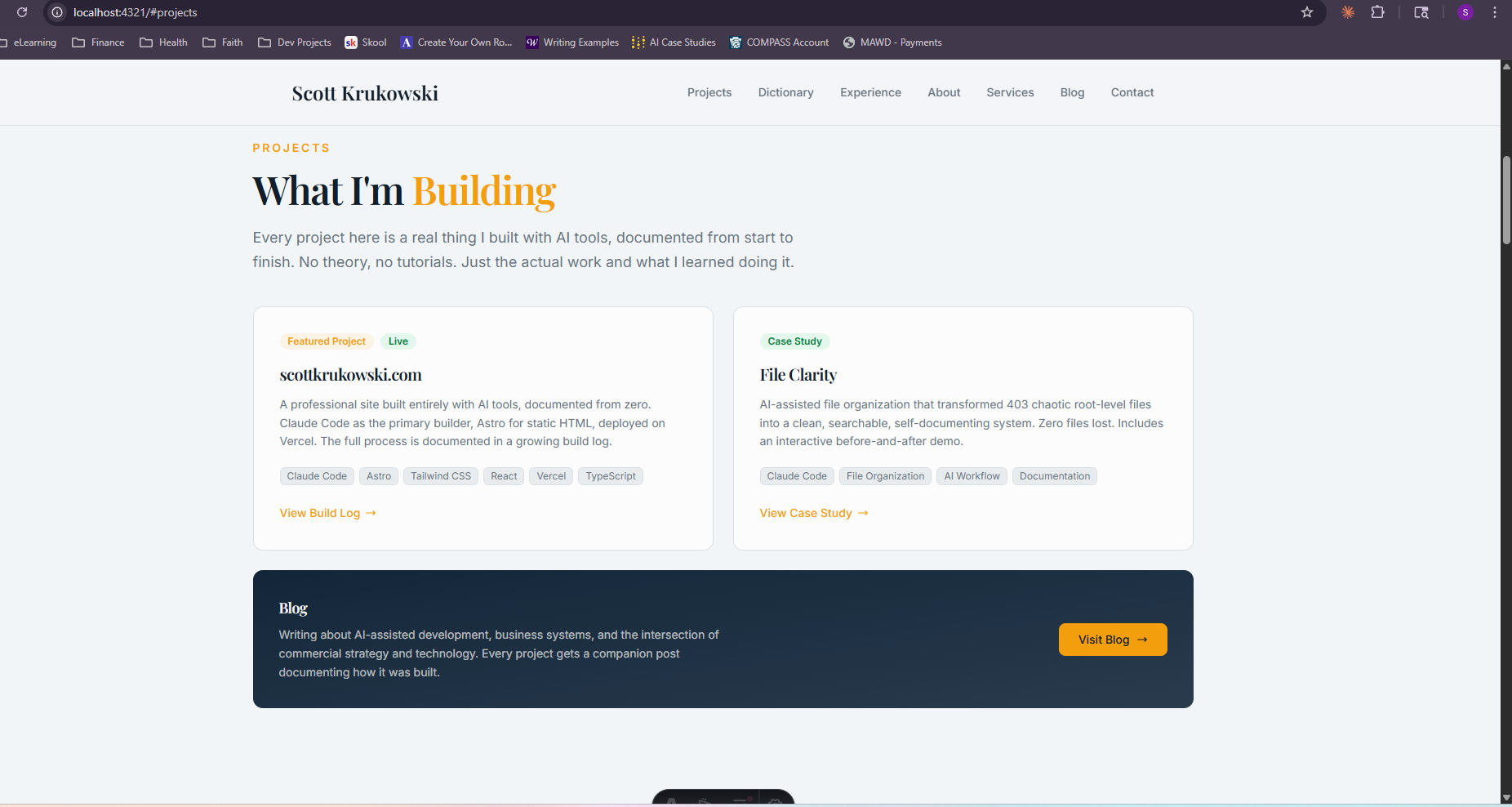
Two project cards side by side. Below them: a “Blog” box with a short description and a “Visit Blog” button. That is it.
The cards were fine. The content was accurate. The design was clean.
The problem was not what the section contained. The problem was what it implied.
What That Layout Said About the Site
A layout with two project cards and a “Visit Blog” button says: this person built two things, and separately, they write sometimes. Two isolated facts. No connection between them. That is the complete story.
But that is not what this site is.
Every project here has a companion blog post. The build process is documented. The decisions are explained. The failures are in there alongside the results. The project card is the entry point, not the destination. Reading the card and not the post is like looking at the table of contents and calling it the book.
The old layout hid that relationship completely. You could land on the homepage, read the project descriptions, and close the tab without knowing there was a 2,000-word build story behind each one. The blog existed, but it was isolated. Behind a separate navigation link, disconnected from the projects it was documenting.
The site was not building in public. It was building in partial public.
The Redesign: Moving the Writing Next to the Work
The first iteration of the fix was a two-column layout: project cards on the left taking two-thirds of the width, a blog sidebar on the right.
The blog sidebar pulled the three most recent published posts dynamically from the Astro content collection, the same system that powers the blog listing page. No manual updates required. Publish a post, it appears in the sidebar automatically.
That was better. The writing was visible on the same screen as the projects. A visitor could see both in the same scroll.
But the sidebar was text-only: a date, a title, a link. Three small entries in a small column. Easy to miss. Easy to dismiss as a secondary element. The visual weight of the blog sidebar did not match the importance of what it was surfacing.
The Current Layout: Artifacts and Writing as Equal Sections
The current version separates the two concerns and gives each one room.
Projects and artifacts get a three-column grid: each card has a type badge (Web Build, AI Workflow, Excel Model), a status indicator (Live, Case Study, Coming Soon), a description that focuses on what problem was solved and what the outcome was, tech tags, and a direct CTA. The grid is designed to grow. The third column currently holds a “Coming Soon” placeholder for the next artifact being documented.
The blog gets a full-width strip below the artifact grid, with three post cards displayed side-by-side. Each card shows the date, the title, and a description excerpt, enough context to know whether the post is relevant before clicking. The visual weight matches the projects section above it.
The divider between them is labeled “From the Blog”, a small signal that says: these two things are related. The writing below is the documentation of the work above.
What Astro Makes Easy Here
The dynamic blog query that powers the blog strip is four lines:
const allPosts = await getCollection('blog');
const recentPosts = allPosts
  .filter((post) => !post.data.draft)
  .sort((a, b) => b.data.pubDate.valueOf() - a.data.pubDate.valueOf())
  .slice(0, 3);
Filter drafts, sort newest first, take three. Astro runs this at build time. No JavaScript executes in the browser, no API call fires on page load. The output is finished HTML. The blog strip updates automatically every time the site rebuilds, which happens automatically every time anything is pushed to GitHub.
The draft: false filter means half-finished posts never surface in the sidebar even if they are sitting in the content collection. The draft workflow is: write, set draft: true, publish when ready by switching to draft: false. The homepage stays clean automatically.
What the Artifact Grid Is Actually For
Projects are the build stories. Artifacts are the things that resulted from them.
The distinction matters as the site grows. A project page tells you how something was built. An artifact is the thing itself: something you can download, use, or interact with. An Excel financial model is an artifact. A Lovable-built CRM is an artifact. A prompt template is an artifact.
The current grid holds two projects and a coming-soon slot. As more artifacts get built and documented, more cards get added. When an artifact becomes downloadable or interactive, the card gets a download CTA or a demo link. The grid is infrastructure for whatever comes next, not just a display case for what already exists.
The Underlying Lesson
The design change was small. The thinking behind it was not.
A portfolio with no writing attached is a resume: a list of things you did. A portfolio where the work and the documentation live together is a lab notebook: a record of how you think, what you tried, what failed, and what shipped.
The second version is harder to fake. Anyone can list two projects. Not everyone will document the decisions behind them.
That is what the redesign was really for. Not the grid layout. The statement that comes with having a “From the Blog” section directly below the work: everything here has a build story, and the build story is part of what you are selling.
There is a line in Colossians 3:23 that stays with me: “Whatever you do, work heartily, as for the Lord and not for men.” The tools are new. The principle is ancient. Build with care, document with honesty, and let the work speak because the One who sees it is not skimming your portfolio.
Comments
Back to all posts